


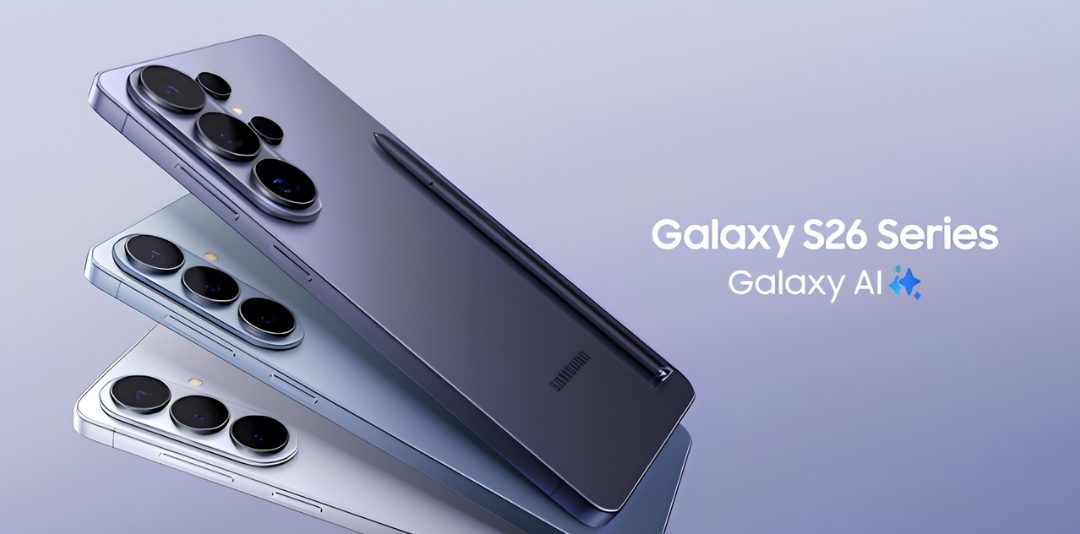
The modern corporate workspace demands a level of agility that traditional office setups simply cannot match. To maintain a competitive edge, professionals must be capable of reviewing contracts, analyzing data trends, and coordinating remote teams while moving between client meetings or travelling for business. Unlock peak efficiency with the Samsung Galaxy S26. Discover how its AI tools, seamless multitasking, and powerful performance help you master your workday.
The Samsung Galaxy S26 is engineered specifically to meet these demanding mobile workflows. Driven by the custom Snapdragon 8 Elite Gen 5 for Galaxy processor, this device introduces core technological advancements and specialized software that eliminate operational friction and save valuable time. Here is an in-depth look at the standout features of the base Galaxy S26 that actively optimize professional productivity.
1. Contextual task automation via upgraded Galaxy AI
The Galaxy S26 utilizes a heavily upgraded, 38% faster Neural Processing Unit (NPU) to shift mobile artificial intelligence from simple editing tricks into a true, proactive digital assistant. Running natively on Android 16 with One UI 8.5, these features smoothly handle daily administrative burdens.
- Now nudge (intelligent file sharing): This context-aware feature acts as a silent assistant by reading the immediate context of your incoming messages. If a colleague texts you asking for files or photos from a recent business trip, Now Nudge automatically surfaces the exact relevant files from your local gallery or storage right above your keyboard. You can attach and send them instantly without ever minimizing your messaging app or manually digging through folders.
- AI select & notification highlights: Managing a flood of daily alerts can easily break your concentration. The Notification Highlights feature uses on-device intelligence to organize your panel, automatically condensing long group chats into short, easy-to-read text summaries and prioritizing time-sensitive alerts at the top. Additionally, using AI Select allows you to quickly scan any active screen to instantly extract text, translate languages, or move data directly into your workflow.
- Advanced call screening & note assist: Juggling unknown business calls is simplified with Call Screening, which answers unknown numbers, evaluates the caller’s intent, and provides a live, on-screen text transcription so you can decide whether to accept the call. For internal meetings, Note Assist transcribes spoken audio, identifies different speakers, removes conversational filler, and formats everything into a structured summary with clear action items.
2. Desktop power in your pocket via Samsung DeX
For hybrid workers and travelling executives, carrying both a smartphone and a heavy corporate laptop is a logistical hassle. The Galaxy S26 addresses this challenge by serving as an independent, primary computing engine.
Samsung DeX allows users to connect the Galaxy S26 to any external monitor or smart display wirelessly or through a USB-C cable. Instantly, the interface shifts from a standard mobile layout to a fully functional, multi-window desktop environment.
By pairing a Bluetooth keyboard and mouse, professionals can seamlessly manage cloud-based CRM software, build intricate financial models, and cross-reference research across multiple open windows exactly as they would on a traditional PC. Meanwhile, the phone continues to operate independently in the background, allowing you to answer incoming client calls without interrupting your primary monitor workflow.
3. Real-time communication expansion with call assist
Expanding your market reach often means collaborating with international clients or managing global supply chains. Language barriers can slow down project momentum and lead to costly miscommunications.
The Call Assist ecosystem on the Galaxy S26 provides real-time, two-way voice and text translation directly during live telephone calls. When speaking to an overseas vendor, the device translates your speech into their native language and translates their responses back to you instantly.
Because all of this heavy linguistic computation takes place locally on the device’s secure hardware, there is no network lag, ensuring your conversations remain fluid, private, and highly professional.
4. Administrative efficiency: Intelligent document scanner
Managing physical paperwork—such as signed agreements, expense receipts, and whiteboard brainstorms—remains a major administrative bottleneck for busy professionals.
The Galaxy S26 simplifies document management through its dedicated Intelligent Document Scanner built into the camera app. When you point the camera at a document, the device doesn’t merely capture an image; it automatically identifies the page boundaries, digitally erases overhead shadows, corrects crooked angles, and flattens folded creases.
More importantly, it applies high-accuracy Optical Character Recognition (OCR). This converts the physical document into a fully searchable, editable digital PDF. You can select text directly from the scanned file, copy sentences into a corporate email, or search for key business terms across dozens of saved files in seconds.
5. Enterprise infrastructure and connectivity
A high-performance productivity tool is only as good as the network supporting it. To maximize the field capabilities of the Galaxy S26, organizations need a robust communication partner that understands corporate operations.
Deploying a fleet of high-performance hardware becomes exceptionally cost-effective when leveraging a TELUS EPP (Exclusive Partner Program), which provides corporate employees with premium-tier discounts on hardware and plans. Connecting these state-of-the-art TELUS Phones to a reliable, nationwide 5G network ensures that cloud data syncs flawlessly without interruption. Furthermore, managing your team’s lines through TELUS Mobility enterprise dashboards allows corporate administrators to deploy security updates and monitor operational workflows seamlessly across the entire team, unlocking the full efficiency of the TELUS network architecture.
6. Built for longevity: core hardware configuration
To reliably sustain intensive multitasking throughout long workdays, the hardware configuration of the base Galaxy S26 is built around peak performance and physical durability.
The device features a bright 6.3-inch Dynamic LTPO AMOLED 2X display (reaching up to 2600 nits) that provides crisp visibility even under direct sunlight, protected by Corning Gorilla Glass Victus 2 and a rugged aluminum frame. Under the hood, it pairs 12GB of high-speed LPDDR5X RAM with ultra-fast UFS 4.0 storage options of either 256GB or 512GB, ensuring massive files and complex applications load instantly. Supported by a robust 4,300 mAh battery with fast charging capabilities, the device keeps you powered from morning presentations to late-night emails.
To ensure your investment ages gracefully, Samsung backs this hardware with an industry-leading commitment of 7 years of major Android OS upgrades and 7 years of security patches, guaranteeing your corporate data remains completely secure and optimized well into the future.
Conclusion: orchestrating an efficient workspace
The ultimate goal of mobile technology shouldn’t be to give professionals more alerts to manage, but rather to give them their time back. The Samsung Galaxy S26 achieves this by acting as a true workforce multiplier. By condensing a powerful desktop environment, an administrative document assistant, a global translation tool, and deeply intuitive AI workflows into a single premium device, it allows busy professionals to optimize every minute of their day.
If your objective is to eliminate friction from your daily routines, minimize administrative overhead, and maximize your output on the go, the Galaxy S26 stands out as an indispensable tool for modern professional productivity.